3D print order management that does not run on memory.
Getting the order is the easy part. Knowing what needs printing, what is done, what is late, and what is ready to ship is the hard part, and it should not depend on bouncing between spreadsheets, Etsy tabs, and printer dashboards.
At low volume it feels fine. Then it does not.
Messy order workflows are manageable until sales pick up. Then production gets harder to see, late orders slip through, and the whole operation depends on whoever remembers the most.
What breaks
Order chaos as you grow
- •Orders live in Etsy, notes, printer dashboards, and your head instead of one workflow
- •It is too easy to lose track of what is new, printing, printed, packed, or late
- •Files, production status, and shipping steps drift apart when volume picks up
- •Manual order management steals time that should be spent printing and shipping
The better path
One workflow, intake to shipment
- ✓Track what is new, printing, printed, and ready to ship
- ✓Keep order status in one place instead of five disconnected tools
- ✓Reduce manual handoffs that create missed steps and delays
- ✓Tie operations to costs and profit instead of treating them separately
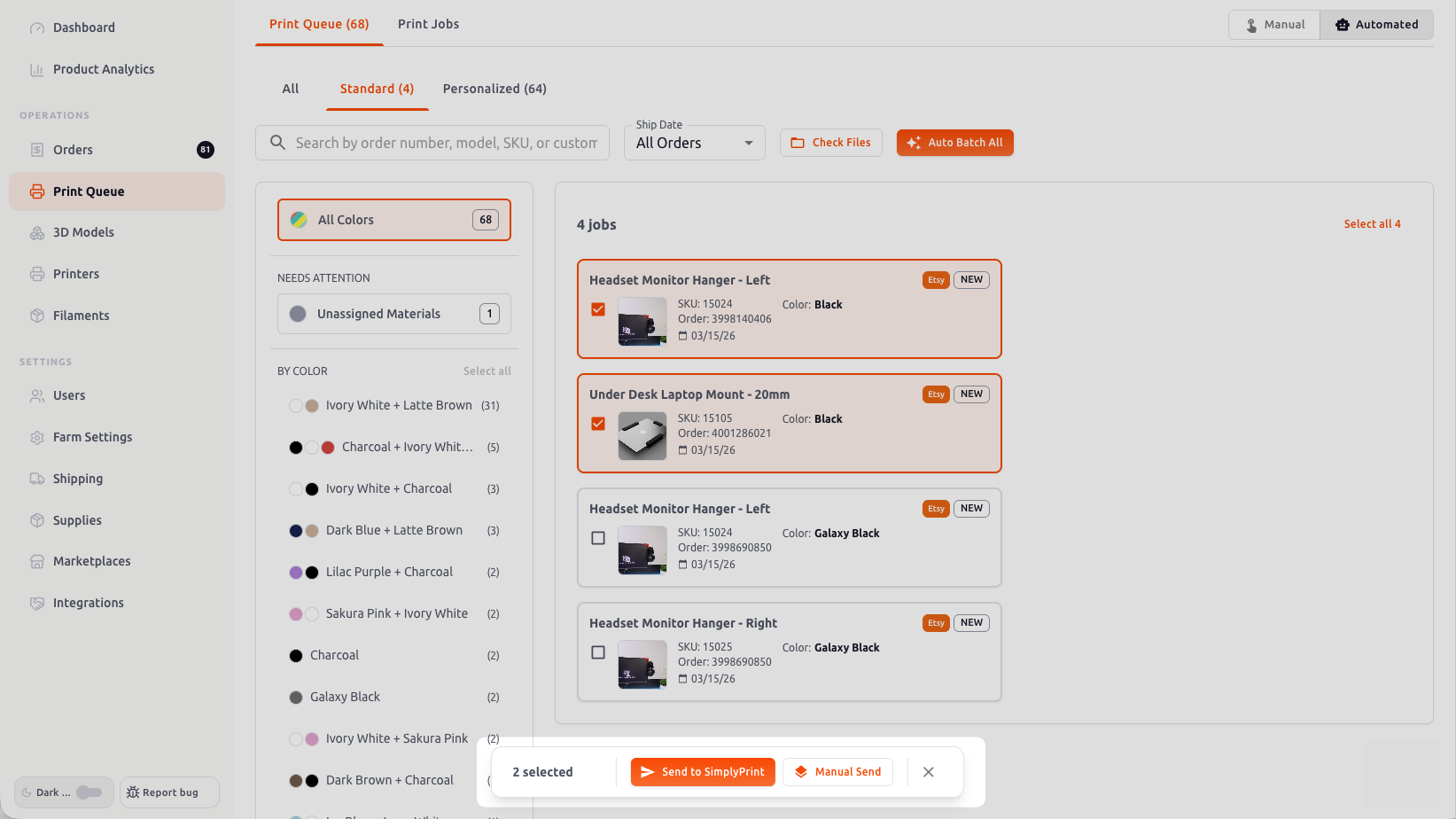
Order management gets real the moment files, print prep, and production routing have to move in sync instead of being tracked in separate places. This is where disconnected tools start slowing everything down.
A better workflow for 3D print order management
The goal is not just organization. It is operational clarity: knowing what needs attention, what is blocked, and what can ship, without treating every day like a scavenger hunt.
1. Centralize every order
Good 3D print order management starts by getting everything into one system. If your orders are split across tabs, messages, and spreadsheets, you do not have visibility. You have guesswork.
2. Make status visible
A real workflow should clearly show what is new, what is printing, what is printed, and what is ready to ship. That alone cuts down missed steps and late orders.
3. Connect operations to profitability
Order management is not just about moving jobs through a queue. It should also connect to costs, fees, and margin so high-volume chaos does not hide low-profit work.
4. Reduce handoffs that create mistakes
Every manual copy-paste or status update is another chance to forget a file, miss a shipment, or lose time. Better systems remove handoffs instead of relying on memory.
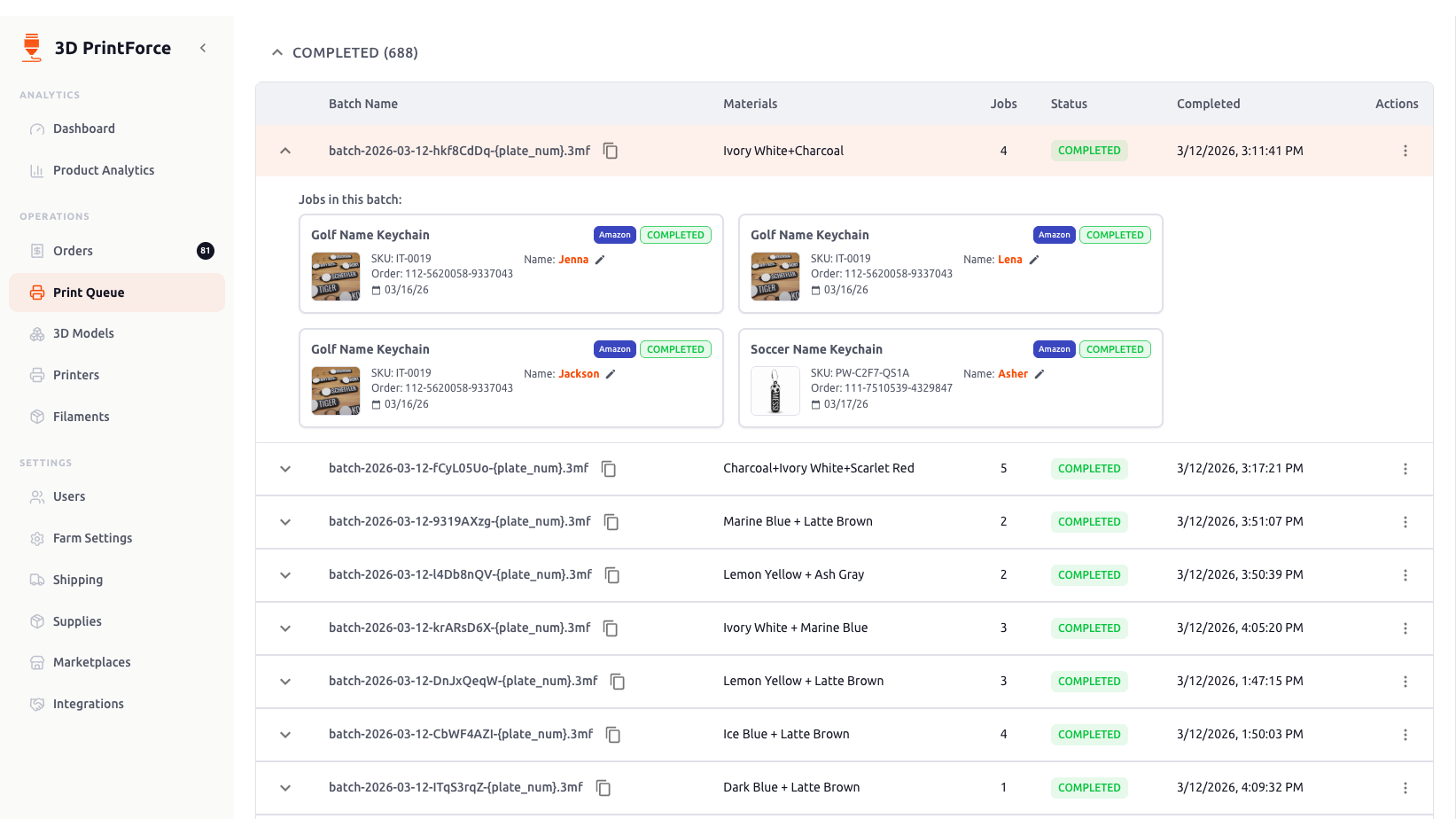
Completion and shipping should feel like the natural next step in the same workflow, not a separate process you stitch together after production finishes.
What better order management actually buys you
Better order management means fewer missed steps, fewer late shipments, and less time lost hunting through tabs to figure out what happens next. You should be able to see the state of the business without rebuilding it from memory.
If your process depends on spreadsheets, scattered notes, and checking multiple tools just to read your print queue, the workflow is already costing you. 3D PrintForce gives 3D print sellers one system for orders, status, and fulfillment instead of a pile of disconnected workarounds.
Related resources
3D print order management FAQ
What is 3D print order management?+
It is the process of tracking an order from intake through printing, post-processing, packing, and shipping. The real goal is fewer missed steps, fewer late orders, and better operational visibility.
Why is order management hard for 3D print sellers?+
Because every order can involve multiple moving parts: files, printers, material, status, deadlines, and shipping. Once volume rises, scattered tools stop being good enough.
Can spreadsheets handle 3D print order management?+
Only until they cannot. They may work at low volume, but they break fast when you are juggling more orders, more products, and more production steps at once.
When should I use software for my print queue and order workflow?+
The second order visibility starts depending on memory, sticky notes, or hunting through tabs. That is the moment your process is already costing you time and mistakes.
Out of order chaos. Into a real workflow.
Use 3D PrintForce to track orders, production status, and profitability without depending on scattered tabs and memory to run the business.
14-day money-back guarantee. Cancel anytime.